A graph-based layout engine for dynamic PDFs
Templara's layout problem is not traditional web layout.
A business document has fixed regions, dynamic regions, repeated rows, page boundaries, generated codes, and export requirements. The system has to know what depends on what.
That makes the document feel less like a page of HTML and more like a graph. The current implementation is not a general graph solver — it is a deterministic tree/graph-shaped layout pipeline. But the mental model is graph-based: every rendered box is the result of relationships between template nodes, data paths, scopes, measurements, and page constraints.
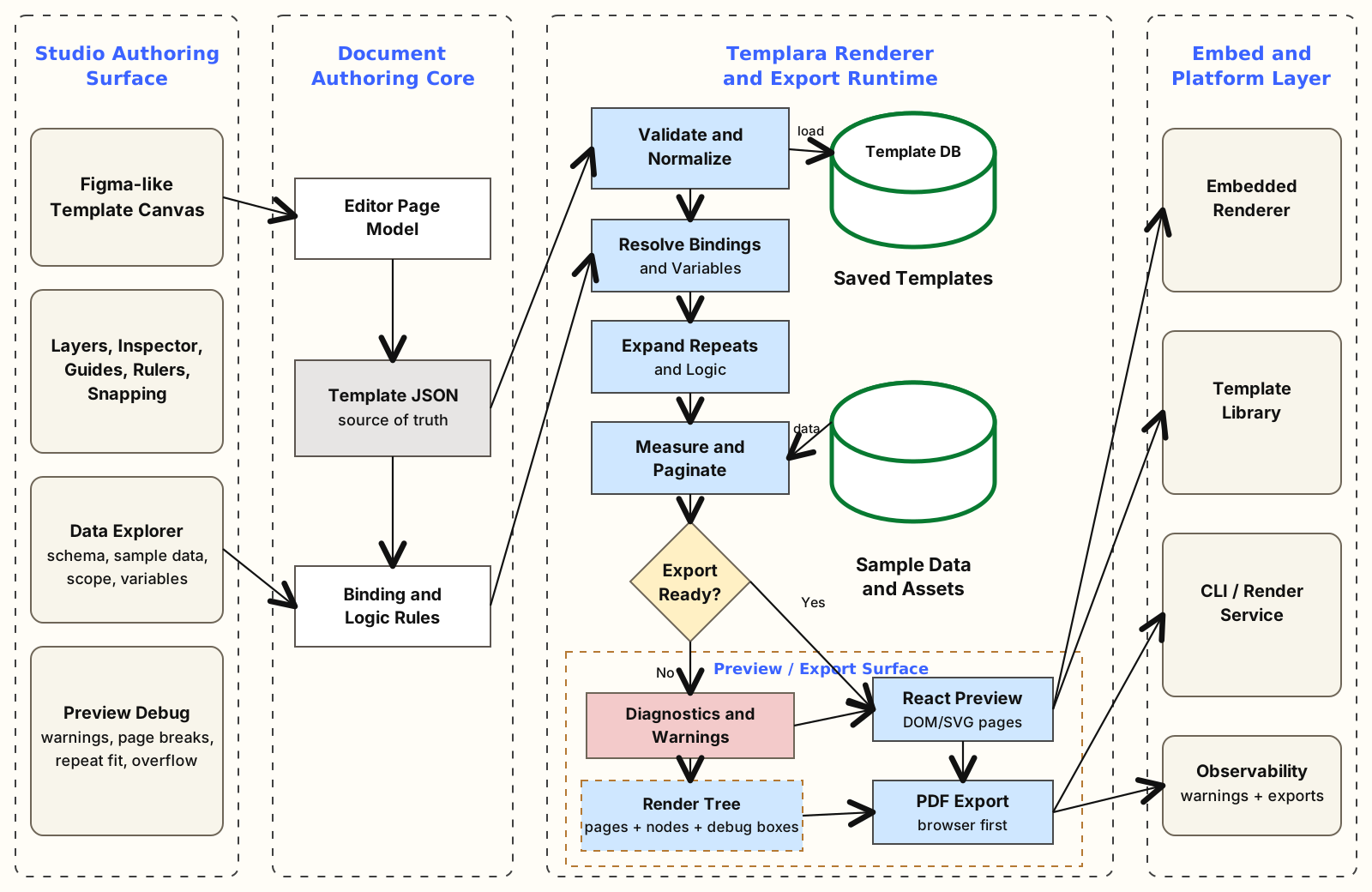
The layout graph
The source graph begins in the template: pages, layers, and nodes. There are two major layout paths:
- fixed layers
- flow layers
template page
  -> layers
    -> nodes
      -> bindings
      -> variables
      -> repeat scopes
      -> flow regions
      -> page-break decisions
      -> render nodes
Fixed nodes render where the designer placed them. Flow nodes move through a cursor, measure their content, and paginate. The renderer starts each page by rendering fixed layers, then flow regions — the first split in the graph.
Flow regions
A flow region defines where dynamic content is allowed to grow. The renderer turns that into a cursor problem: which page, and how far down.
The cursor is small, but it carries the whole pagination story. Each flow node consumes a cursor and returns the next one. That is the core algorithm.
interface FlowCursor {
  pageIndex: number;
  y: number;
}

interface FlowContext {
  sourcePage: PageTemplate;
  initialPageIndex: number;
  region: FlowRegionNode;
  continuationTop: number;
  continuationBottom: number;
  firstPageBottom: number;
}

let cursor: FlowCursor = {
  pageIndex: initialPageIndex,
  y: region.frame.y,
};

for (const child of region.children) {
  cursor = renderFlowNode(state, context, cursor, child, emptyScope(), {
    x: region.frame.x,
    y: 0,
  });
}Dynamic nodes
Flow nodes are not all the same — text, images, shapes, barcodes, sections, stacks, repeats, conditionals, grids. The renderer dispatches by type.
export type FlowNode =
  | TextNode
  | ImageNode
  | ShapeNode
  | BarcodeNode
  | QrNode
  | SectionNode
  | StackNode
  | RepeatNode
  | ConditionalNode
  | GridNode
  | GroupNode;
That makes the layout graph explicit. A node may depend on visibility logic, current data scope, measured height, available page space, and its authored frame.
Repeats are subgraphs
Repeats create a subgraph for every item in an array. At render time the repeat resolves its binding, builds a row plan per item — children, scope, index, count, heights — then decides what fits on the current page and what moves to continuation pages.
That row plan is the graph-expanded version of the template row.
Pagination is a constraint
The layout engine has to satisfy page constraints:
- first-page flow bottom
- continuation page top and bottom
- row height and gap
- keep-together behavior
- unbreakable overflow warnings
That is why flow context carries both first-page and continuation boundaries. The renderer can then answer: Does this row fit here? Should the section break before this node? Is the content taller than any available page area?
Repeat-fit analysis is not just for tests — it is product UX. Preview should explain why the document paginated the way it did.
From render tree to PDF
The renderer does not directly print a PDF. It creates a render tree that can feed React preview, browser-first PDF export, future image or server rendering, and tests.
export interface RenderDocumentResult {
  pages: RenderPage[];
  warnings: RenderWarning[];
  repeatAnalyses: RepeatFitAnalysis[];
  fonts: RenderFontDefinition[];
  selectedFontFamily?: string;
}That separation matters. PDF export should consume a planned document, not re-run its own layout semantics.
Why graph-based thinking helps
Calling this graph-based is less about a graph database and more about respecting dependencies. A rendered text box depends on source nodes, field runs, data, variables, formatting, measurement, flow position, and page constraints. A repeat row adds array binding, item scope, and pagination state. A final PDF page depends on presets, fixed nodes, flow decisions, warnings, and export preflight.
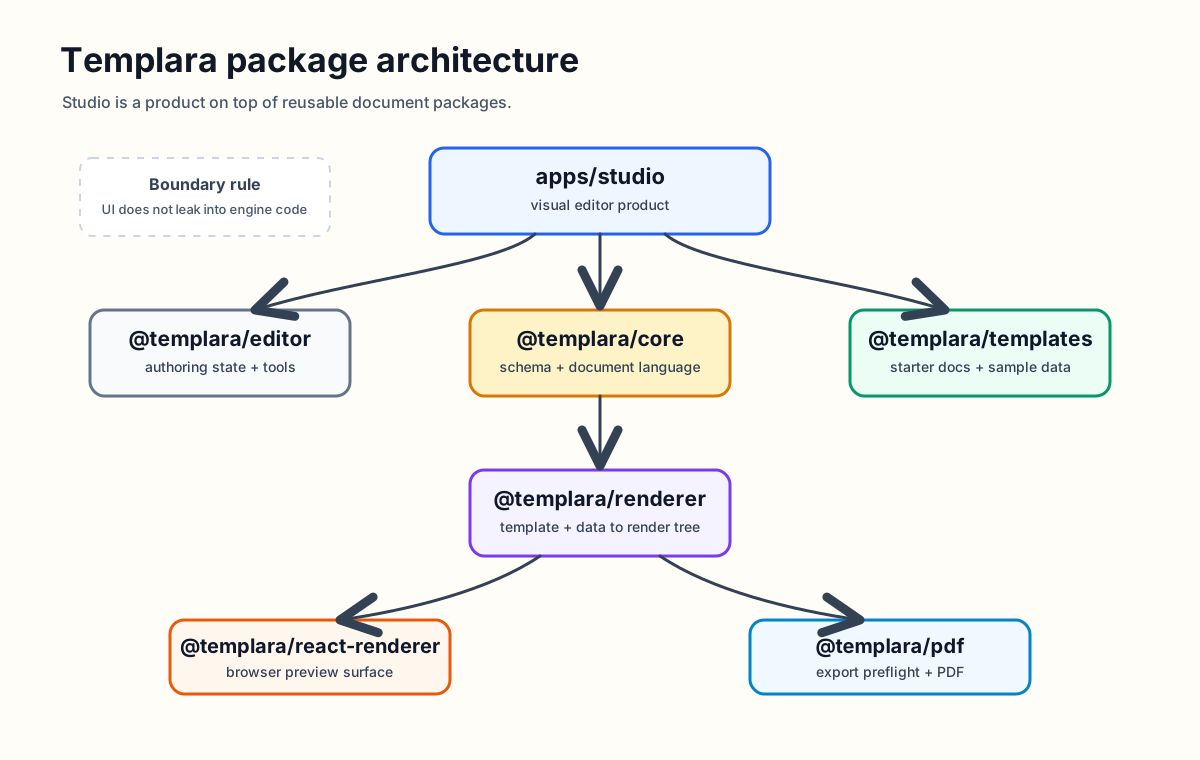
Once you see the system that way, the architecture becomes clearer. The renderer is not a DOM painter. It is a deterministic graph expansion and layout pipeline for business documents.
Originally on Templara docs