The editor is not the renderer
The biggest architecture decision in Templara is also the easiest one to underestimate: the editor is not the renderer.
That sounds obvious until you build a document tool. The tempting move is one rendering path for everything — take the template, run it through the renderer, show the result on the canvas, and let the user edit what they see.
That works for simple documents. It breaks down as soon as the document has structured data, repeats, pagination, variables, and logic.
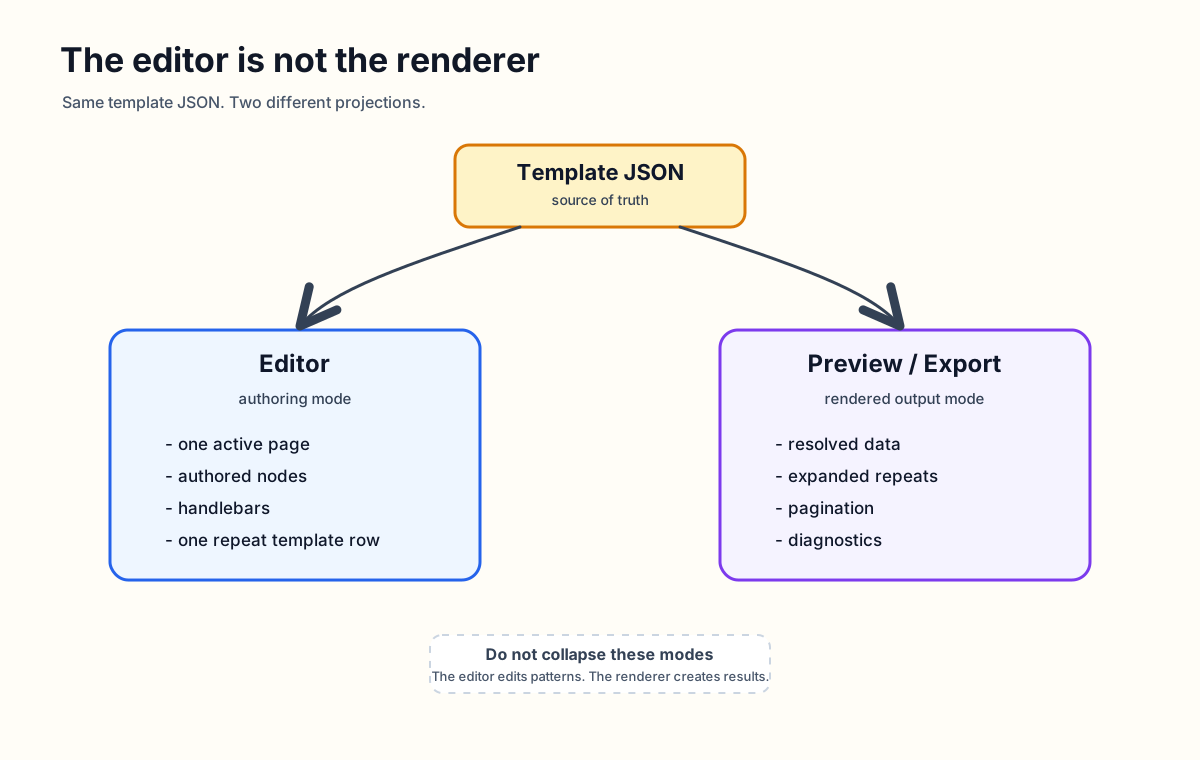
Two experiences, one source
Templara needs two different experiences that share the same template JSON, but do not show the same thing:
- authoring mode
- preview / export mode
Editor:
  template JSON -> authored page model -> design canvas

Preview/export:
  template JSON + data JSON -> render tree -> preview/PDF
Authoring mode shows the template
The editor is where the user designs the template. It should show the thing being designed — not the final paginated result.
- one active page
- authored nodes and field placeholders
- one repeat template row
- flow region frames
- layers, guides, rulers, selection, and inspectors
It should not show expanded arrays, generated continuation pages, final paginated output, or resolved sample data as the only editable state.
If the user creates a repeat row for shipment.handlingUnits, the editor should show the row template — not expand every handling unit from sample data across the canvas. That is why the editor walks authored template nodes into its own page model instead of calling renderDocument.
export interface EditorPageModel {
  id: string;
  name: string;
  size: Size;
  margin?: PageTemplate["margin"];
  nodes: EditorRenderNode[];
}

export function buildEditorPageModel(
  template: DocumentTemplate,
  pageId?: string,
): EditorPageModel {
  const page = findPage(template, pageId);
  const assets = new Map(
    template.assets?.map((asset) => [asset.id, asset]),
  );
  const nodes = page.layers.flatMap((layer) =>
    renderNodeCollection(layer.nodes, {
      pageId: page.id,
      layerId: layer.id,
      layerKind: layer.kind,
      depth: 0,
      parentPath: `${page.id}.${layer.id}`,
      origin: { x: 0, y: 0 },
      assets,
    }),
  );

  return {
    id: page.id,
    name: page.name ?? page.id,
    size: page.size,
    margin: page.margin,
    nodes,
  };
}Preview and export show the result
Preview and export have a different job. They take template plus data and produce a render tree — resolved fields, expanded repeats, evaluated conditionals, measured content, page breaks, continuation pages, and diagnostics.
The React preview paints that tree. It does not decide what the template means. The preview renderer is downstream from layout.
Why one path breaks
A single render path sounds simpler, but it creates bad product behavior.
Imagine editing an invoice line-item row. If the canvas uses final rendered output, sample data might generate 30 rows. Which row is the template? If the user moves the third rendered row, did they move the row template or only that one data instance?
Now add pagination. If a repeat overflows onto page 2, should the user edit the continuation page? If they drag a row on page 2, should that change the template row on page 1?
Now add missing data. If a field is empty, does the node disappear from the editable canvas? How does the user select it and fix the binding?
These are not edge cases. They are the normal cases for structured business documents. Same source. Different projections.
Repeats make the decision obvious
Repeats are the clearest example. In the editor, a repeat node is one editable container — the user designs the row once. In the renderer, that node resolves its binding, creates row plans, measures them, and paginates overflow.
export interface RepeatNode extends BaseNode {
  type: "repeat";
  binding: BindingRef;
  itemAlias: string;
  layout: RepeatLayout;
  children: FlowNode[];
  header?: FlowNode[];
  emptyState?: FlowNode[];
}- in authoring, it is a pattern
- in preview, it is a generated result
Mixing those meanings makes the product confusing.
Handlebars are an authoring feature
In the editor, bindings should stay visible as placeholders. That is not a limitation — it is useful. The user needs to know what they are designing. If every field is replaced with sample data on the authoring canvas, the template becomes less visible.
Editor shows:   {{business.name}}
Preview shows:  Northstar Logistics
Preview resolves values. The editor shows structure. Both are correct. They answer different questions.
Pagination belongs to preview
Pagination is output behavior. The editor can show flow regions and repeat frames, but it should not create continuation pages while the user is designing a single template page.
The renderer owns page-break decisions because those decisions depend on data, measurement, fonts, row heights, and available page space. That separation also makes diagnostics possible — overflow, bad bindings, missing assets — which the PDF package can turn into export preflight.
The rule
The editor edits authored template JSON.
The renderer renders template JSON with data.
The preview displays renderer output.
The exporter exports renderer output.
The editor is allowed to be interactive, contextual, forgiving, and optimized for manipulation. The renderer is allowed to be deterministic, diagnostic-heavy, and optimized for final output. The preview is allowed to show truth with sample data. The exporter is allowed to block or warn when the output is unreliable.
Templara works because those jobs do not collapse into one another. The editor is not the renderer. That is the architecture.
Originally on Templara docs